
Ensure a nice-looking Counter Product Display


Drive Through
1/
2
The Why - “A New Reality”
Drive Through stores is a huge benefit for JOE & THE JUICE. Why? Because, it allows our guests to quickly and conveniently place orders without ever having to leave their vehicle. This provides us with a unique and efficient guest experience, which can help to increase the guest satisfaction and loyalty. Additionally, the Drive Through setup can help to increase sales and revenue by providing an additional channel for our guests to make purchases. In other words, this is a new reality and a huge step for JOE & THE JUICE.

Operational Framework
See below which softwares, equipments and procedures that is needed to run a Drive Through smoothly:
- The Needed Equipment
- Order Overview from a Guest & Juicers Point of View
- Drive Through Team Positioning
- Drive Through Handling Flow
1. The Needed Equipment
Drive Through POS
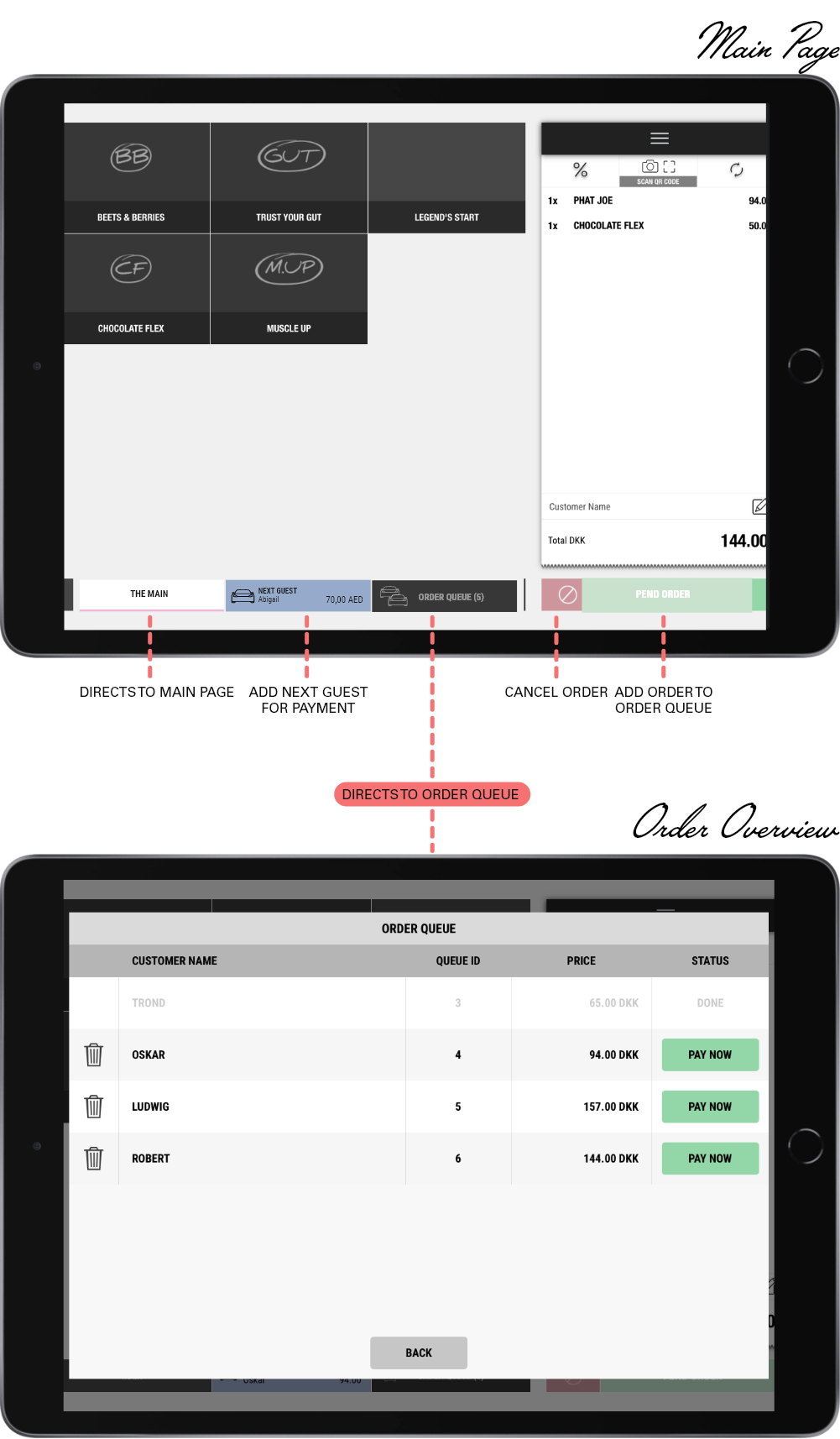
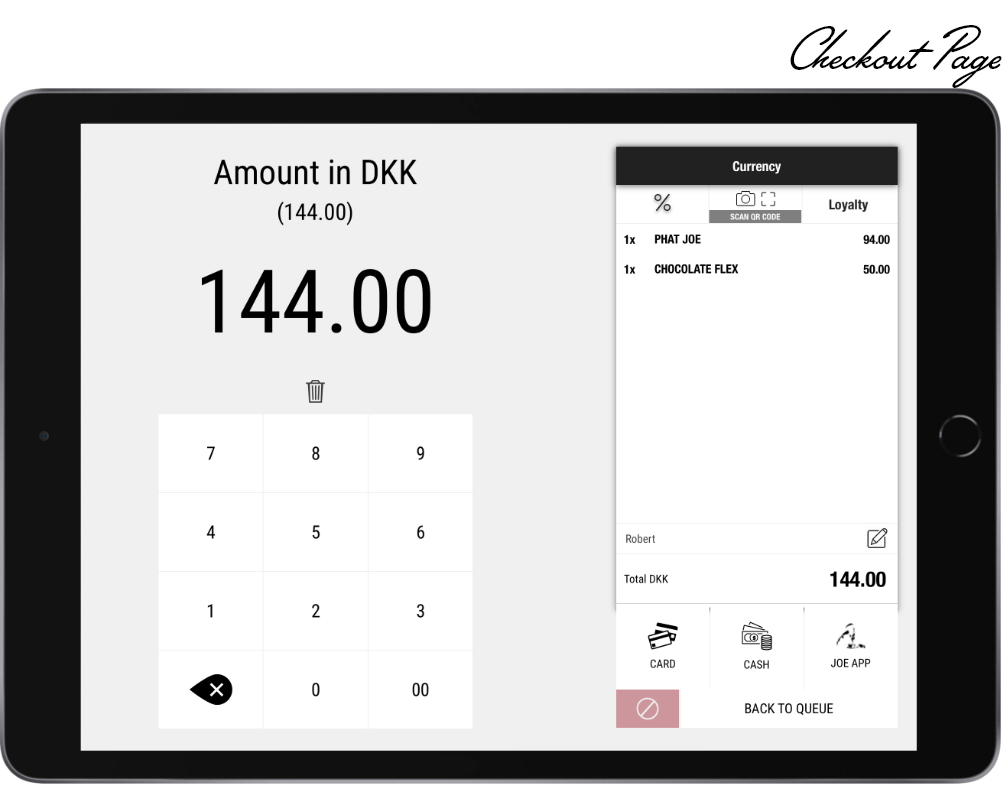
The Drive Through POS App is an updated version of the standard POS App you are familiar with.
See the updated POS app below:
Drive Through List
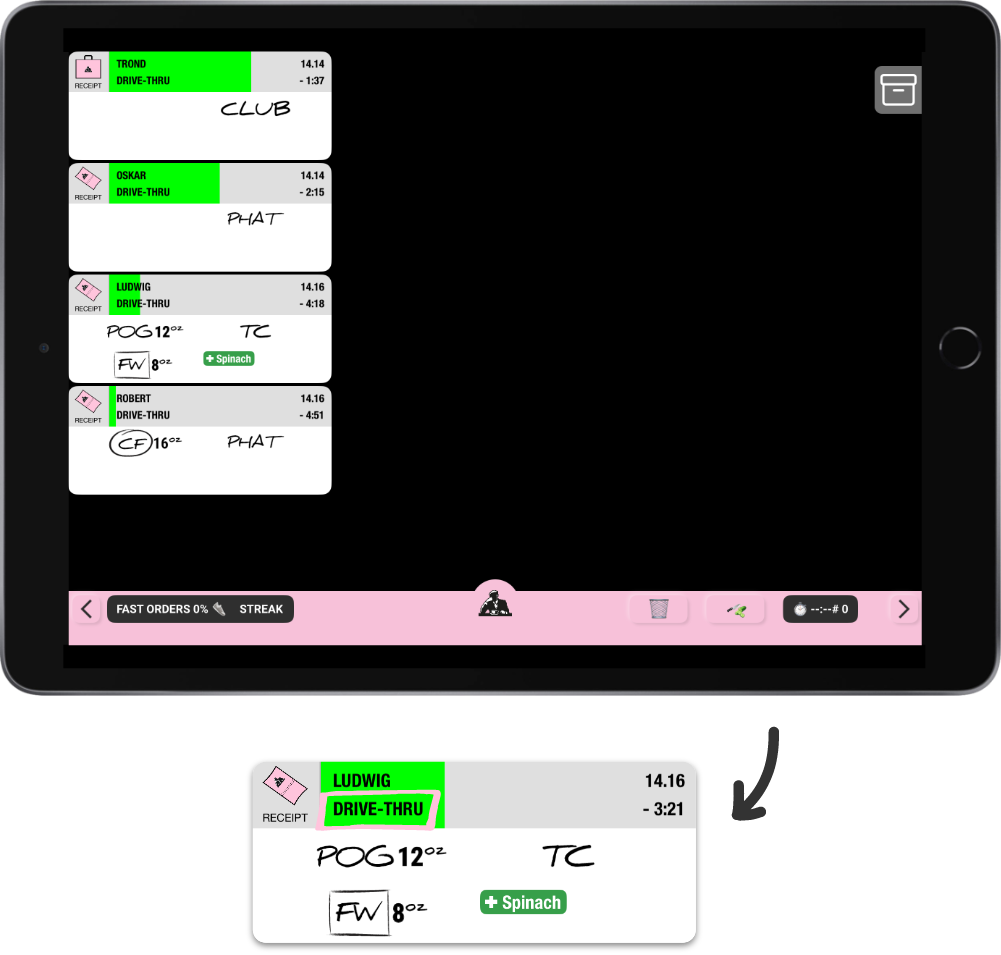
The Drive Through List will ONLY show Drive Through orders and will not be connected to any other the Lists in the store.
See the updated List below:
Communication Chanels
By using headset is a effective communication way between the guests in their vehicles and the order taker taking their orders.

The reason why we are using headsets in the Drive Through:
- Communication: The order taker are able to hear the guest approaches the Drive Through lane and therefore can speak directly into the microphone and the order taker and the guest can have a conversation.
- Hands- free operation: Headsets allow employees to have their hands free to perform other tasks while taking orders.
- Noise Reduction: A Drive Thorough can be noisy some times due to traffic or other external factors. Headset will minimize background noise and ensure clear communication.
- Mobility: Headsets provide mobility for the order taker to move around freely within the drive-through area.
Ordering Screens - Drive Thru Lane
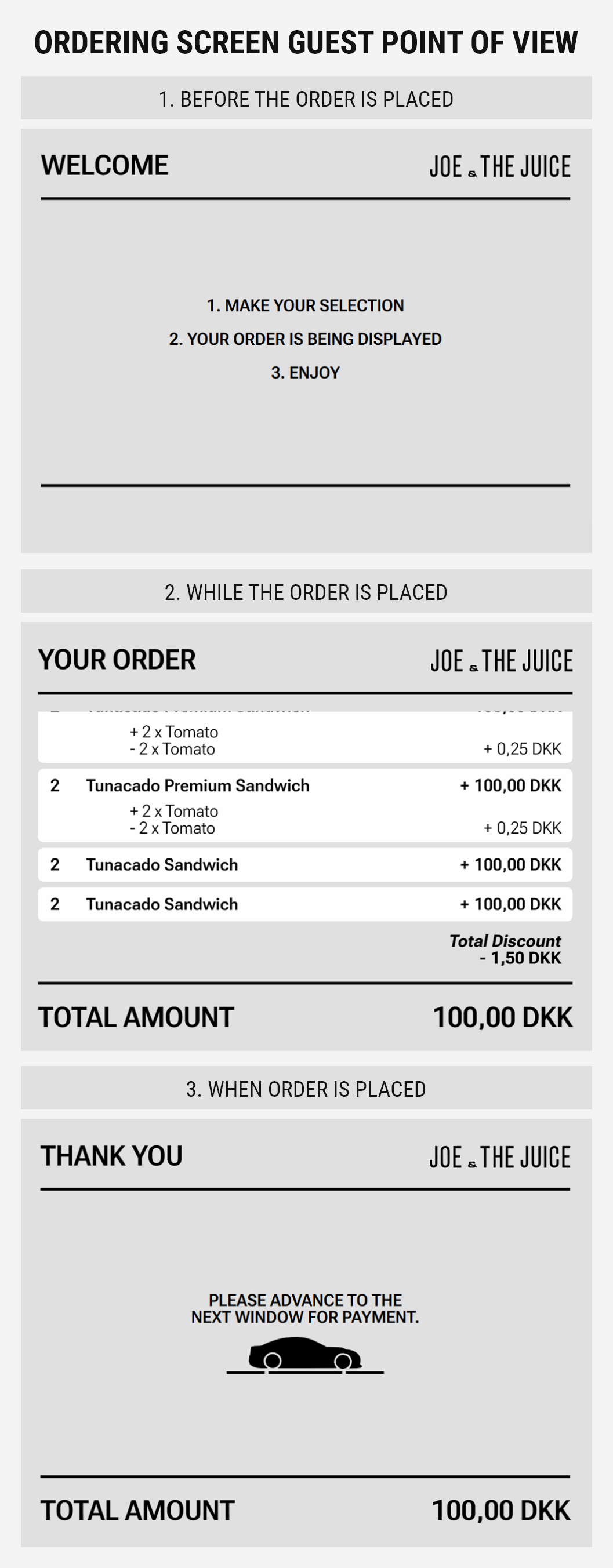
The ordering screens are used to communicate with the guest from the Drive Through POS and juicer inside the store. The ordering screens for the juicer and the guests are all connected, meaning that when an order is received through the speaker system at the ordering screen, the Juicer at the Drive Through POS will type in the order an the pending order will be visible for the guest. This is done to ensure alignment between guest and juicer.
The Ordering screen for the Guest Point of View contains three different modes dependent on the status of the order:
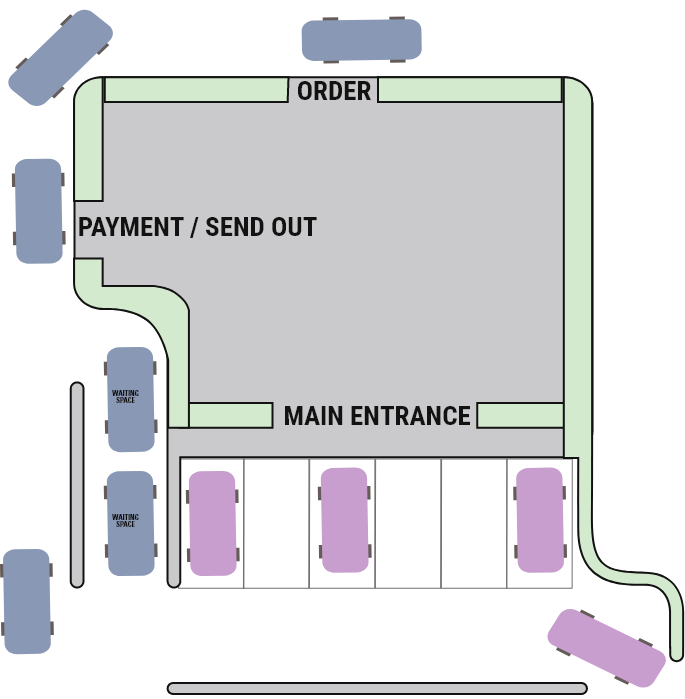
2. Order Overview
From a Juicers & a Guest Point of View:
3. Drive Through Team Positioning
To perform at our full potential as a team behind the bar there are two important roles refer to the different positions or responsibilities that the juicers have when working in a Drive Through store. These roles vary depending on the traffic in the store.
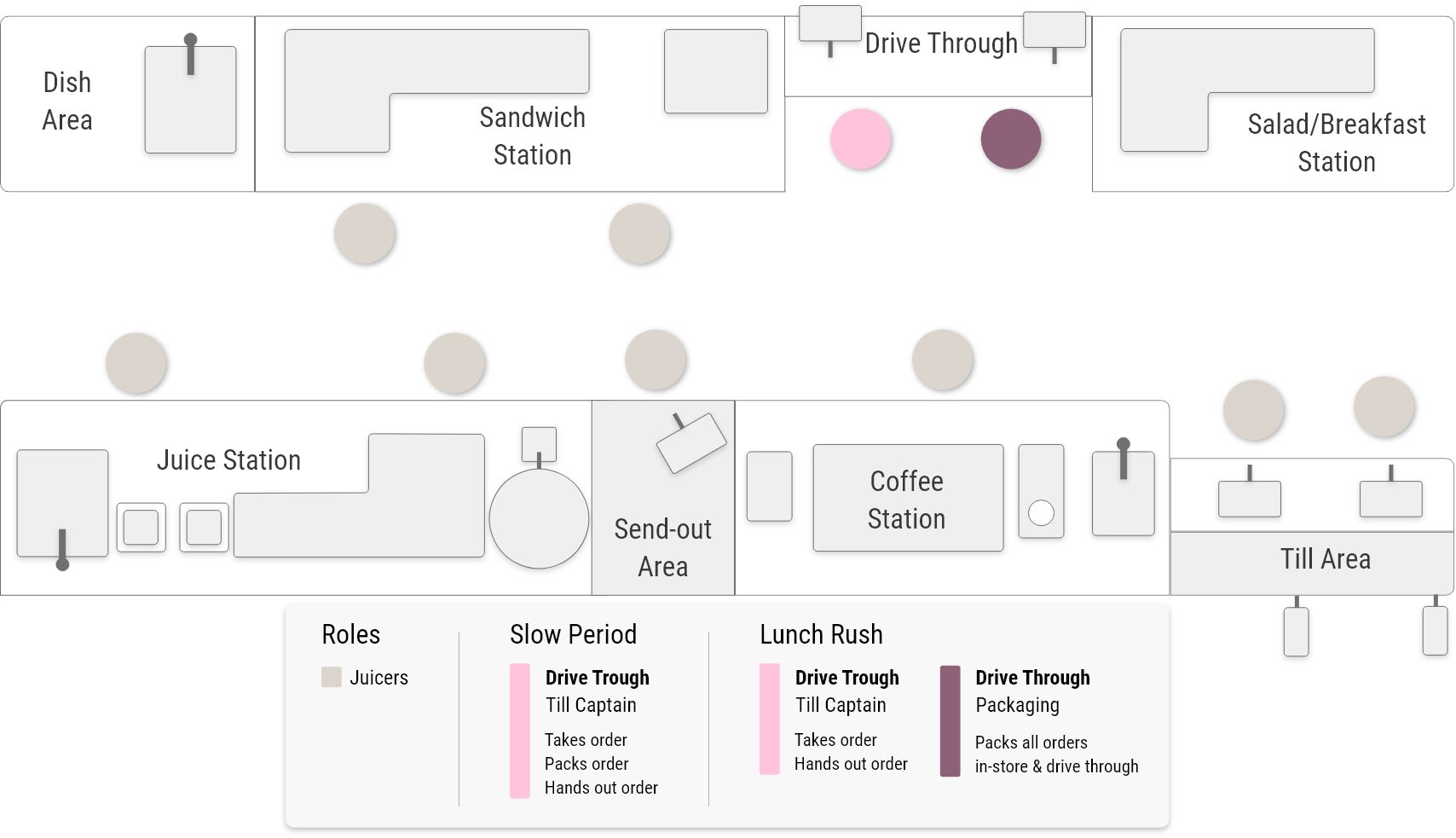
The Send- Out Specialist are the last person who can ensure all our guests leaves with a good impression by saying farewell or goodbye.
4. Drive Through Handling Flow
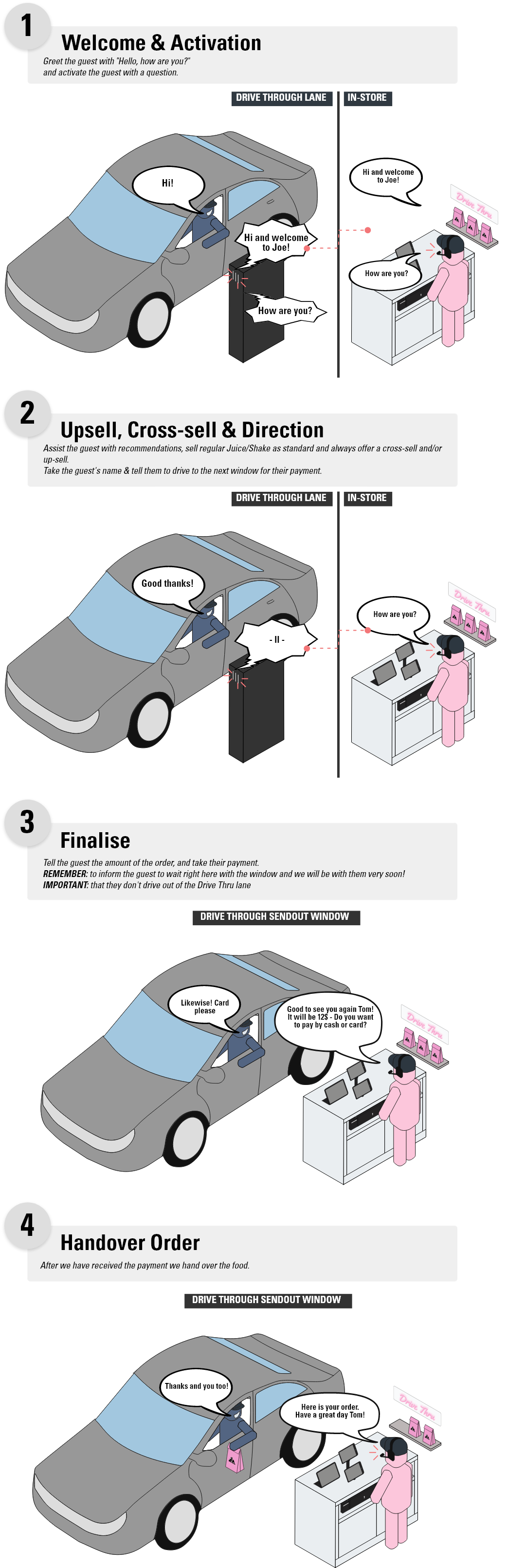
Go through the eight steps of the Drive Through Handling Flow illustrations.
The Why - “A New Reality”
Drive Through stores is a huge benefit for JOE & THE JUICE. Why? Because, it allows our guests to quickly and conveniently place orders without ever having to leave their vehicle. This provides us with a unique and efficient guest experience, which can help to increase the guest satisfaction and loyalty. Additionally, the Drive Through setup can help to increase sales and revenue by providing an additional channel for our guests to make purchases. In other words, this is a new reality and a huge step for JOE & THE JUICE.
Operational Framework
See below which softwares, equipments and procedures that is needed to run a Drive Through smoothly:
- The Needed Equipment
- Order Overview from a Guest & Juicers Point of View
- Drive Through Team Positioning
- Drive Through Handling Flow
1. The Needed Equipment
Drive Through POS
The Drive Through POS App is an updated version of the standard POS App you are familiar with.
See the updated POS app below:

Drive Through List
The Drive Through List will ONLY show Drive Through orders and will not be connected to any other the Lists in the store.
See the updated List below:

Communication Chanels
By using headset is a effective communication way between the guests in their vehicles and the order taker taking their orders.
The reason why we are using headsets in the Drive Through:
- Communication: The order taker are able to hear the guest approaches the Drive Through lane and therefore can speak directly into the microphone and the order taker and the guest can have a conversation.
- Hands- free operation: Headsets allow employees to have their hands free to perform other tasks while taking orders.
- Noise Reduction: A Drive Thorough can be noisy some times due to traffic or other external factors. Headset will minimize background noise and ensure clear communication.
- Mobility: Headsets provide mobility for the order taker to move around freely within the drive-through area.
Ordering Screens - Drive Thru Lane
The ordering screens are used to communicate with the guest from the Drive Through POS and juicer inside the store. The ordering screens for the juicer and the guests are all connected, meaning that when an order is received through the speaker system at the ordering screen, the Juicer at the Drive Through POS will type in the order an the pending order will be visible for the guest. This is done to ensure alignment between guest and juicer.
The Ordering screen for the Guest Point of View contains three different modes dependent on the status of the order:

The Ordering screen for the Juicers Point of View shows the guest in the Drive Through Lane, promotion banners and the Order Status

2. Order Overview
From a Juicers & a Guest Point of View:
3. Drive Through Team Positioning
To perform at our full potential as a team behind the bar there are four important roles refer to the different positions or responsibilities that the juicers have when working in a Drive Through store. These roles can vary depending on the specific establishment and its operational requirements.

- The Drive Through, Till Captain: The Till Captain is an important role. Why, because the first impression are made by the Till Captain and their only priority is to focus on the guest and take their order.
Remember: The Till Captain should always give an “Good First Impression” and have Brand Behaviour in the mind we take the guest orders.

- The Product Makers: Will receive orders through The List and prepare the products. The Product Makers ensures that orders are completed accurately and with the correct waiting time. The Product Makers first priority is to make all products and the second priority is to hand orders to the Packaging Area.

- The Drive Through, Packaging Specialist: Is responsible for collecting all products to the order and ensuring they are correctly packaged. The Packaging Specialist first priority is to pack all To-Go orders and give them to the Send- Out Specialist and the second priority is to help the Product Makers make products.

- The Drive Through, Send- Out Specialist: Will primarily operates at the Drive Through window. Keeping overview of all product being send- out. Making sure the Drive Thru bags are organised and presentable and thevguests receive correct orders and provide the needed utensils.
The Send- Out Specialist first priority is to take guests payment and send- out guests orders. The second priority is to package all orders thich will go through the Drive Thru window.
The Send- Out Specialist are the last person who can ensure all our guests leaves with a good impression by saying farewell or goodbye.
4. Drive Through Handling Flow
Go through the eight steps of the Drive Through Handling Flow illustrations.


Checklist
Find your markets Checklist here
IMS Sheets
Find your markets IMS Sheets here
Validation Checklist
Find your markets Validation Checklist here


.png)


IMS Sheets
Find your markets IMS Sheets here
Validation Checklist
Find your markets Validation Checklist here


How to videos

IMS Sheets
Find your markets IMS Sheets here
Validation Checklist
Find your markets Validation Checklist here


Closing Tasks
Deep Clean Centrifuge

Closing Tasks
Espresso Machine Cleaning
IMS Sheets
Find your markets IMS Sheets here
Validation Checklist
Find your markets Validation Checklist here
Cleaning Tasks

Clean Bar Bins

Clean Bar Lamps + Speakers

Clean Bar Front

Clean Bar Filters

Clean Seating and Tables

Clean Trash Bins in Customer Area

Clean Cleaning Tools

Clean Drains

Clean Floor Panels

Clean Walls and Pictures

Clean Fridges

Clean Dishwasher

Clean Sinks

Deep Clean Stockroom + Fridges

Deep Clean Mythos

Deep Clean GB5
Transport Wagons
Bar Cabinets
How to handle Cleaning Detergents

Dishwasher Detergent
Cafiza
Multipurpose
IMS Sheets
Find your markets IMS Sheets here
Validation Checklist
Find your markets Validation Checklist here


Prev
13/
2
IMS Sheets
Find your markets IMS Sheets here
Validation Checklist
Find your markets Validation Checklist here
